 5.0
5.0


What Are Managed IT Services? A Complete Guide for Growing Businesses
TLDR
Managed IT services are an ongoing model where a third-party managed service provider monitors, supports, secures, and maintains your business technology for a predictable monthly fee.
Instead of waiting for systems to break, managed IT services focus on prevention, uptime, cybersecurity, help desk support, cloud management, backups, patching, and long-term IT planning.
For growing small and mid-sized businesses, managed IT services can reduce downtime, improve security, control IT costs, and give leadership one accountable partner for day-to-day technology operations.
Why are businesses paying more attention to managed IT services?
Technology now affects almost every part of business performance. Sales teams depend on cloud tools. Employees need secure access from different locations. Customer data must be protected. Downtime can delay work, frustrate clients, and create financial risk.
This is one reason the managed services market continues to grow. Mordor Intelligence estimates that the managed services market will grow from USD 430.56 billion in 2026 to USD 704.2 billion by 2031.
The growth is not just because companies want IT support. It is because businesses are realizing that reactive, break-fix technology management is no longer enough.
When IT is handled only after something fails, leaders face recurring issues:
- Unpredictable support costs
- Slow response times
- Poor cybersecurity visibility
- Vendor confusion
- Unclear ownership
- Remote work challenges
- Untested backups
- Systems that do not scale with the business
Managed IT services solve these problems by turning IT into a proactive, structured function. Instead of waiting for disruption, an MSP helps prevent it.
What are managed IT services?
Managed IT services are outsourced IT management services delivered by a third-party provider, usually under a monthly agreement or service level agreement.
A managed service provider, often called an MSP, takes responsibility for specific parts of your IT environment. This can include computers, servers, cloud platforms, networks, cybersecurity tools, user support, backups, and vendor coordination.
In simple terms, managed IT services help your business keep technology stable, secure, and productive without relying only on internal staff or emergency IT vendors.
A typical managed IT services relationship includes:
- Ongoing monitoring
- Help desk support
- Security updates
- Patch management
- Device management
- Backup monitoring
- Cloud administration
- Network support
- Vendor coordination
- IT planning and reporting
The goal is not just to fix problems. The goal is to reduce the number of problems that happen in the first place.
How do managed IT services work?
Managed IT services usually begin with an assessment of your current technology environment.
The provider reviews your devices, users, software, cloud tools, networks, security controls, backups, vendors, and known issues. This gives both sides a clear understanding of what needs to be supported and where the risks are.
A typical managed IT services process looks like this:
- Discovery and assessment
The MSP reviews your current IT setup, support history, security gaps, devices, users, cloud platforms, and business requirements. - Scope and service agreement
You agree on what is included, what is not included, response times, escalation paths, billing model, reporting, and service expectations. - Onboarding and documentation
The provider documents your environment, deploys monitoring tools, secures access, reviews backup processes, and organizes vendor information. - Ongoing support and monitoring
The MSP handles user tickets, monitors systems, manages updates, responds to alerts, and resolves issues before they become larger disruptions. - Reporting and strategic reviews
The provider reviews performance, recurring issues, cybersecurity posture, upcoming technology needs, and future budget planning.
This is where managed IT support becomes different from basic technical support. It creates an operating rhythm for IT, not just a repair service.
What is included in managed IT services?
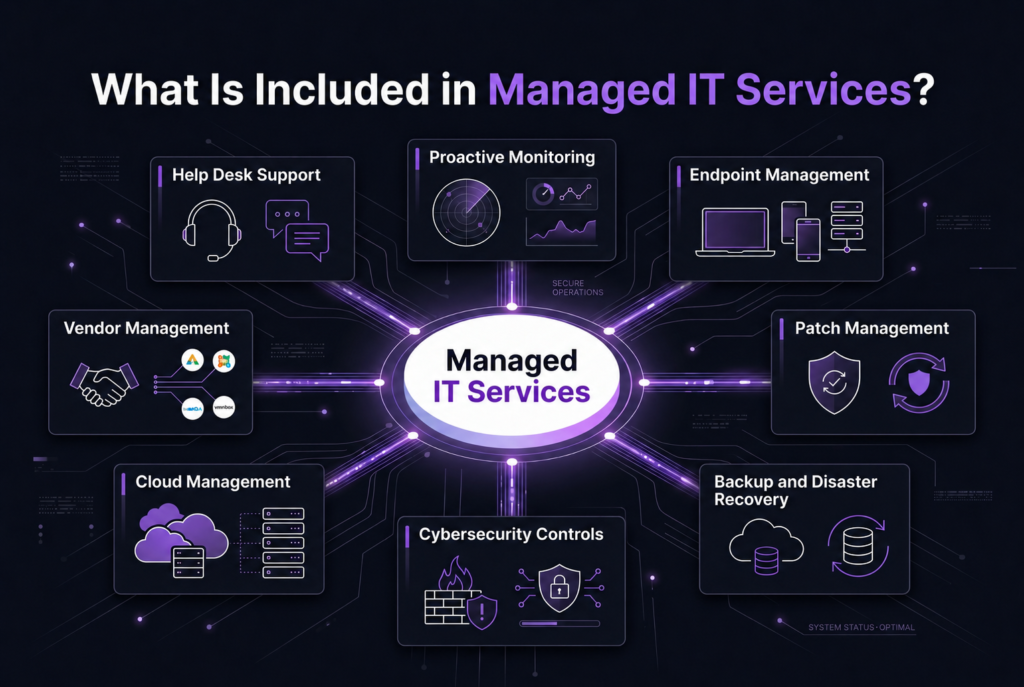
The exact scope depends on the provider, but a strong managed IT services package should cover the core areas that keep a business running securely.
Common inclusions include:
Help desk support
Employees get support for login issues, email problems, device errors, software access, printer problems, and everyday technical issues.
Proactive monitoring
Servers, networks, endpoints, and critical systems are monitored for performance issues, alerts, and early warning signs.
Endpoint management
Laptops, desktops, and mobile devices are configured, updated, secured, and managed throughout their lifecycle.
Patch management
Operating systems and applications are updated regularly to reduce vulnerabilities and improve stability.
Backup and disaster recovery
Backups are monitored, tested, and planned so the business can recover from accidental deletion, system failure, cyber incidents, or outages.
Cybersecurity controls
Managed IT support often includes security basics such as multi-factor authentication, endpoint protection, email filtering, access controls, and security hardening. For more advanced protection, businesses may also need dedicated cyber security services.
Cloud management
The provider manages platforms such as Microsoft 365, Google Workspace, Azure, AWS, file sharing, permissions, and cloud security settings. Businesses with more complex cloud environments may also need structured cloud services.
Network support
Managed IT can include Wi-Fi, switches, firewalls, VPNs, connectivity issues, and network performance monitoring. If segmentation, firewall rules, IDS, IPS, VPN architecture, or traffic monitoring are a priority, dedicated network security services may be required.
Vendor management
The MSP acts as a central point of contact for internet providers, software vendors, hardware suppliers, and other technology partners.
How are managed IT services different from break-fix IT support?
Managed IT services are proactive and ongoing. Break-fix IT support is reactive and issue-based.
With break-fix support, a provider is usually called only when something breaks. The business pays for the time spent diagnosing and repairing the issue. This can work for very small businesses with minimal technology needs, but it becomes risky as operations grow.
With managed IT services, the provider is responsible for continuous monitoring, maintenance, support, security improvements, and long-term planning.
Area | Managed IT Services | Break-Fix IT Support |
Support model | Proactive and ongoing | Reactive and issue-based |
Cost structure | Predictable monthly fee | Variable hourly billing |
Monitoring | Continuous system monitoring | Usually limited or absent |
Security | Built into daily IT operations | Often handled after a problem appears |
Business alignment | Focused on uptime and prevention | Focused on fixing reported issues |
Planning | Includes reporting and future roadmap | Usually no strategic planning |
The biggest difference is accountability. Managed IT creates ownership over the health of your environment. Break-fix support usually creates action only after disruption has already occurred.
What is the difference between managed IT support and outsourced IT services?
Managed IT support is usually one type of outsourced IT service.
Outsourced IT services is a broader term. It can include one-time projects, cybersecurity assessments, cloud migrations, network upgrades, compliance consulting, IT staffing, procurement, or strategic advisory work.
Managed IT support usually refers to ongoing IT operations under a recurring agreement. It often includes help desk support, monitoring, patching, endpoint management, backup oversight, and daily IT administration.
For example, a company may use outsourced IT services for a one-time cloud migration. That same company may use managed IT support for everyday user support, system monitoring, and security updates after the migration is complete.
In many cases, businesses need both. Projects help modernize the environment. Managed IT services help keep it stable after the project is complete.
What are the main benefits of managed IT services?
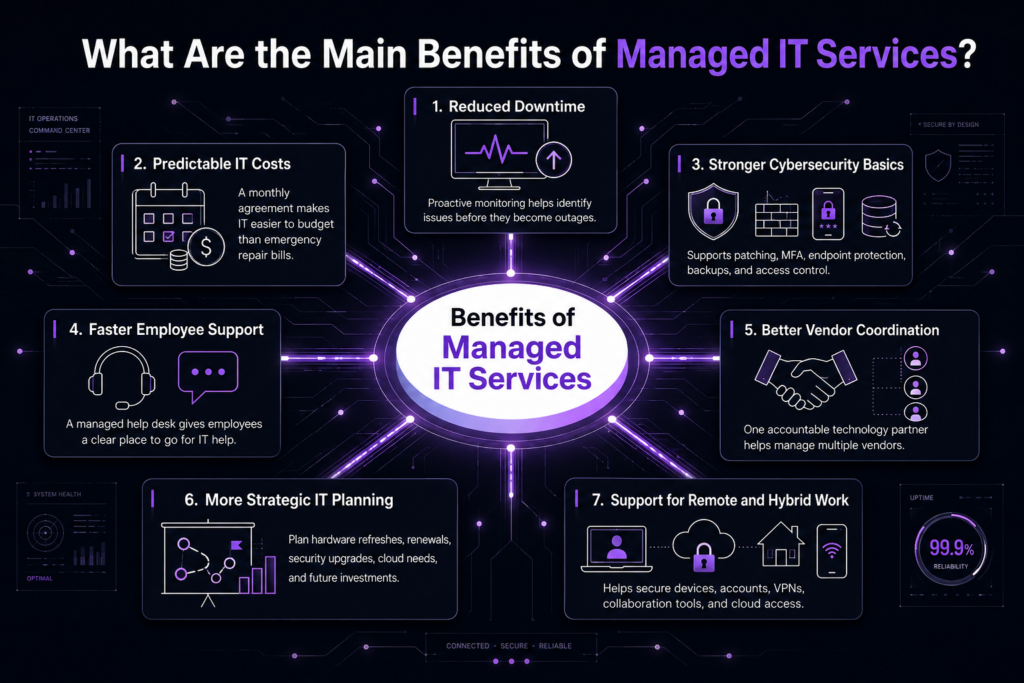
The main benefit of managed IT services is that your business gets structured technology support without building a large internal IT department.
The most important benefits include:
Reduced downtime
Proactive monitoring helps identify issues before they become outages.
Predictable IT costs
A monthly agreement makes IT easier to budget compared with emergency repair bills.
Stronger cybersecurity basics
An MSP can help enforce patching, multi-factor authentication, endpoint protection, backup monitoring, and access control.
Faster employee support
A managed help desk gives employees a clear place to go when technology slows them down.
Better vendor coordination
Instead of chasing multiple vendors, your business has one accountable technology partner.
More strategic IT planning
A good MSP helps leadership plan hardware refreshes, software renewals, security upgrades, cloud needs, and future investments.
Support for remote and hybrid work
Managed IT services help secure devices, accounts, VPNs, collaboration tools, and cloud access for distributed teams.
What types of businesses need managed IT services?
Managed IT services are often a strong fit for small and mid-sized businesses that rely on technology but do not have enough internal capacity to manage everything properly.
Your business may be a good fit if:
- You have 10 to 500 employees
- Your team depends heavily on cloud tools
- You have recurring IT issues
- Employees wait too long for support
- You are worried about cybersecurity
- You have remote or hybrid employees
- You are unsure whether backups are tested
- Your office manager or leadership team is managing vendors
- Your internal IT team is overloaded
- You are growing faster than your IT processes
Managed IT is also useful for industries where data protection, uptime, and access control matter, such as healthcare, finance, legal, professional services, manufacturing, education, and technology companies.
When should a business consider managed IT services?
A business should consider managed IT services when technology issues start affecting productivity, security, cost control, or growth.
Use this checklist as a quick self-assessment:
- Support tickets are taking too long to resolve
- IT costs are unpredictable
- You do not have clear documentation for devices, users, or vendors
- Backups exist, but no one tests them
- Cybersecurity feels reactive
- Employees complain about slow systems or poor remote access
- You are unsure who owns IT decisions
- Software renewals and hardware replacements are not planned
- Internal IT staff spend most of their time on basic support
- Leadership has no visibility into IT performance or risk
If more than three of these sound familiar, it may be time to evaluate managed IT services.
Are managed IT services right for every business?
No. Managed IT services are valuable, but they are not the right fit for every company.
A very small business with only a few users, simple systems, and low operational risk may not need a full managed IT agreement yet. In that case, basic support or project-based assistance may be enough.
Managed IT services become more important when technology becomes business-critical. If downtime affects revenue, if data security matters, if remote access is essential, or if leadership needs predictable IT operations, managed IT becomes much more valuable.
The decision should be based on risk, complexity, and business dependence on technology, not just company size.
How do you choose the right managed IT services provider?
Choosing the right MSP is not just about finding someone who can answer tickets. You are selecting a partner that will have visibility into your systems, users, data, and operational risks.
Look for a provider that can clearly explain:
- What is included in the monthly fee
- What is billed separately
- How response times are defined
- How systems are monitored
- How cybersecurity is built into the service
- How backups are tested
- How onboarding works
- How vendors are managed
- How reporting is shared
- How future IT planning is handled
You should also look for evidence of process. A good managed IT provider should have clear onboarding steps, documentation standards, escalation paths, security practices, and review meetings.
What questions should you ask before hiring a managed IT provider?
Before signing an agreement, ask practical questions that reveal how the provider actually works.
Good questions include:
- What services are included in the monthly agreement?
- What is considered out of scope?
- What are your response time commitments?
- How do you handle after-hours emergencies?
- How do you monitor endpoints, servers, and networks?
- How do you manage patching and security updates?
- How often do you test backups?
- What cybersecurity controls are included?
- How do you document our IT environment?
- How do you help us plan future IT investments?
The provider should be able to answer these questions clearly. If the answers are vague, that is a warning sign.
How can OnionGrid help with managed IT services?
OnionGrid helps businesses move from reactive IT support to proactive, secure, and structured technology management.
Our managed IT services are designed to support daily operations, reduce downtime, strengthen security practices, and give leadership a clearer view of the technology environment.
Because OnionGrid also works across cybersecurity, cloud, network data, and network security, the managed IT model is not treated as basic help desk support. It is connected to the wider technology foundation your business depends on.
If your business is dealing with recurring IT problems, security concerns, vendor confusion, or systems that no longer support growth, it may be time to review your current setup.
Book a free consultation with OnionGrid to assess your IT environment and identify the right next step.
People Also Ask
How much do managed IT services cost?
Managed IT services are usually priced per user, per device, or through a flat monthly agreement. The cost depends on the number of users, locations, systems, security requirements, support hours, and service scope.
Do managed IT services include cybersecurity?
Some cybersecurity basics are often included, such as patching, endpoint protection, MFA support, and monitoring. However, advanced cybersecurity services such as penetration testing, incident response, vulnerability management, or SIEM monitoring may require a separate security service.
Can managed IT services work with an internal IT team?
Yes. This is often called co-managed IT. The MSP can handle help desk tickets, monitoring, patching, backups, or after-hours support while the internal IT team focuses on strategy and larger projects.
How long does onboarding take?
For many small and mid-sized businesses, onboarding may take several weeks. The timeline depends on the number of users, devices, systems, vendors, security gaps, and documentation quality.
What is the biggest sign that a business needs managed IT support?
The biggest sign is not one major outage. It is a repeated pattern of slow support, unclear ownership, recurring downtime, security concerns, and leadership not knowing whether the IT environment is truly stable.