 5.0
5.0

Active BEC attack, zero security controls: how a Canadian clean-energy SME was secured in 30 days
Industry: Mobile off-grid power and storage
Region: Ontario, Canada
Engagement: Incident response, platform migration, security hardening
Year: 2026
Summary
A nine-person Canadian clean-energy company came to OnionGrid while under active Business Email Compromise attack. Two fraudulent domains were running at once: one impersonating the company to its own customers, the other impersonating a known vendor to the company’s senior staff. Neither of the client’s domains had SPF, DKIM, or DMARC configured, so nothing was in place to detect or stop any of it.
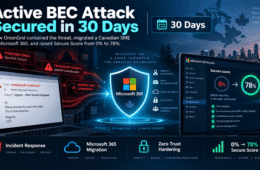
OnionGrid reported both fraudulent domains for takedown, migrated the business from an unprotected Google Workspace tenant to Microsoft 365 Business Premium with zero downtime, deployed full email authentication and Zero Trust identity controls, and ran a forensic investigation across 16 log sources and more than one million events. The client’s Microsoft Secure Score moved from 0% to 78% — roughly 31 points above the industry average of 46.72% — inside 30 days.
Engagement at a glance
Industry | Mobile off-grid power and storage |
Location | Ontario, Canada |
Team size | 9 — fully remote, BYOD |
Previous platform | Google Workspace, no security controls configured |
Domains managed | 2 custom domains |
Engagement type | Incident response + migration + security hardening |
Duration | 30 days |
Headline outcomes: 2 fraudulent domains reported for takedown · 78% Microsoft Secure Score achieved from a 0% baseline · 9 mailboxes migrated and secured · 16 log sources forensically analysed across 1M+ events
The situation: two live attacks and no defences
This was not a preventative engagement. The client contacted OnionGrid mid-incident, with two separate fraud operations already running against them.
Customer-facing fraud. A lookalike of the client’s own domain — the real domain with a single additional letter, [client-domain]s.com — had been registered through an overseas registrar and was sending fake invoices to the client’s customers. To a customer scanning an inbox, the sender looked correct.
Vendor impersonation. A second domain was impersonating one of the client’s actual vendors and had already delivered fraudulent bank details to senior staff. This one is covered in detail in the next section, because of how it was built.
No email authentication on either domain. Neither of the client’s domains had SPF, DKIM, or DMARC records in place. Anyone, anywhere, could send email as the client with no technical barrier and no detection.
Malware sitting in an old mailbox. Forensic analysis during migration surfaced seven emails carrying confirmed malware or virus content in a senior staff member’s legacy mailbox. They were blocked at the migration boundary and never reached the new environment.
No endpoint protection across a fully BYOD team. Nine people, all remote, all working from personal devices, with no enterprise endpoint security and no central visibility into what was accessing company email.
How the vendor attack passed every automated security check
This is the part of the engagement worth studying, because the attack was not caught by any technical control — and by design, could not have been.
The client’s vendor used the Odoo business platform, reachable at a subdomain in the form [vendor].odoo.com. The attackers registered [vendor]odoo.com — the identical string with the dot removed. Read quickly, in a mail client that truncates long addresses, the two are visually indistinguishable.
They then built out the fraud properly:
- Reconnaissance. The attackers identified a genuine vendor relationship and the platform that vendor used. This was targeted work, not spray-and-pray.
- Lookalike domain registration. They registered the dot-removed domain, set up Zoho Mail on it, and configured full SPF, DKIM, and DMARC records. They also created five fake staff identities on the domain so internal-looking CCs would hold up to inspection.
- Email chain insertion. The fraudulent email arrived as a reply inside an active payment thread. It carried real conversational context, a real subject line history, and a valid In-Reply-To header referencing a genuine prior message.
- Fraudulent bank details delivered. An attachment containing fraudulent bank account details was sent to senior staff. SPF passed. DKIM passed. DMARC passed. Antivirus returned clean. Zero automated flags were raised anywhere in the chain.
Why SPF, DKIM, and DMARC did not stop this attack
Email authentication answers one question: did this message genuinely originate from the domain it claims to be from? It does not, and cannot, answer whether that domain is itself fraudulent.
An attacker who registers their own domain and configures authentication correctly on it will pass SPF, DKIM, and DMARC every single time — because they are not spoofing anyone. They are sending authentic mail from a domain they legitimately control, which happens to be named to deceive a human reader.
This is the single most important point for any organisation to understand about modern BEC: a clean authentication result means the sender is who they say they are, not that they are who you think they are. The only reliable defence against lookalike-domain vendor fraud is a mandatory verbal verification step on every payment or bank-detail change, using a phone number from your own records.
What OnionGrid did
A structured six-phase engagement, sequenced to stop active loss first and build durable controls second.
Phase 1 — Fraud reporting and containment
Both fraudulent domains were reported to ICANN, the domain registrars, the Canadian Anti-Fraud Centre, Google Safe Browsing, Microsoft SmartScreen, Netcraft, and Spamhaus. OnionGrid drafted customer warning communications so the client could get ahead of the invoice fraud with its own customer base, and formally confirmed the vendor-impersonation domain as a platform lookalike.
Phase 2 — Platform migration
Microsoft 365 Business Premium was procured and provisioned. Both domains were verified, nine mailboxes created, and all historical email data migrated out of Google Workspace. MX records were cut over with zero downtime, and email aliases were reconfigured across both domains.
Phase 3 — Email authentication
DKIM, SPF, and DMARC were deployed on both domains, with DMARC set to p=reject — the strictest enforcement level, instructing receiving servers to reject spoofed mail outright rather than quarantine it. DMARC aggregate and forensic reporting were enabled for ongoing visibility, all records were externally verified, and an unrecognised third-party SPF include was removed from the record.
Phase 4 — Identity and access controls
MFA was enforced for every user. Conditional Access policies were deployed covering geo-fencing, legacy authentication blocking, and risk-based sign-in controls. A break-glass administrator account was configured for disaster recovery. Security Defaults were replaced with granular Conditional Access, and app consent and guest access were both tightened.
Phase 5 — Threat protection
Standard and Strict preset security policies were enabled across the tenant. Safe Links, Safe Attachments, anti-phishing, and impersonation protection were deployed. External auto-forwarding — a standard attacker persistence technique — was blocked. Microsoft Defender for Business was rolled out across personal Windows, Mac, iPhone, and Android devices, and audit logging was verified as active.
Phase 6 — Forensic investigation
OnionGrid analysed 16 Google Workspace log sources spanning more than one million events. The investigation confirmed the attack vector, identified the malware-infected emails, and surfaced suspicious OAuth authorisations, an end-of-life device in active use, and flagged login activity on a third-party partner account. The output was a full forensic report the client could use for insurance, law enforcement, and board reporting.
Results
Before engagement | After engagement | |
|---|---|---|
Microsoft Secure Score | 0% | 78% (industry average: 46.72%) |
Email authentication | None on either domain | DKIM, SPF, DMARC at p=reject |
MFA coverage | None | All 9 users |
Endpoint protection | None | Defender for Business on all BYOD devices |
Audit logging | Not configured | Enabled and verified |
Fraudulent domains | 2 operating unchallenged | Both reported for takedown |
Email authentication. Domain spoofing of either client domain is now rejected globally at the receiving server.
Zero Trust identity. MFA for all users, geo-fencing active, legacy authentication blocked, Conditional Access enforced on every sign-in regardless of device or location.
Threat protection. Defender deployed, with Safe Links, Safe Attachments, anti-phishing, and impersonation protection live across the tenant.
Compliance controls. Audit logging enabled, app consent restricted to verified publishers, guest access limited, external auto-forwarding blocked.
Forensic clarity. Attack vector confirmed in writing, 16 log sources analysed, both fraudulent domains reported.
BYOD security. Endpoint protection running on personal devices across a fully remote team, with central visibility.
Key takeaways for Canadian SMEs
SPF, DKIM, and DMARC stop domain spoofing — not lookalike domains. A fraudster sending from a domain they own will always pass authentication. These controls are necessary and insufficient.
Verbal verification is the only reliable defence against vendor impersonation. No payment or bank-detail change should ever be actioned on an email alone, using a number from your own records rather than the email.
Attackers research their targets. This attack required knowing which vendor the client used and which platform that vendor ran on. Assume that information is discoverable.
An unhardened Google Workspace tenant is not an enterprise email platform. Out of the box, without deliberate configuration, it is an attack surface.
Log analysis after a suspected incident is not optional. The logs told a complete, dated, evidentiary story that no amount of human recollection could reconstruct.
BYOD is a policy decision, not an exemption. A fully remote team on personal devices still needs managed endpoint protection.
CIS Benchmark Level 1 controls deployed
- MFA for all users and administrators
- Legacy authentication protocols blocked
- Geo-fencing via Conditional Access
- App consent restricted to verified publishers
- External auto-forwarding blocked
- Mailbox auditing enabled organisation-wide
- Safe Links and Safe Attachments
- Guest access and admin centre restrictions
- SharePoint session controls
- Consumer storage blocked in Microsoft 365
Frequently asked questions
Can SPF, DKIM, and DMARC stop a lookalike domain attack? No. Email authentication verifies that a message genuinely came from the domain in the sender address. It cannot assess whether that domain is fraudulent. An attacker who registers their own lookalike domain and configures authentication on it will pass all three checks. Authentication stops spoofing of your domain; it does nothing about a different domain built to resemble yours.
What is a platform lookalike domain? A domain that impersonates a legitimate company’s hosted platform subdomain by removing or altering a single character — for example registering companyodoo.com to impersonate company.odoo.com. Because many businesses genuinely communicate from platform subdomains, the format itself looks familiar to recipients.
How long does it take to secure a small business after a BEC attack? In this engagement, containment, full platform migration, email authentication, identity controls, threat protection, and a forensic investigation were completed within 30 days for a nine-person organisation. Timeline depends on mailbox count, domain count, and whether data migration is required.
What is a good Microsoft Secure Score for a small business? The industry average referenced during this engagement was 46.72%. This client reached 78% after hardening. Secure Score is a relative measure of configured controls rather than a pass mark, but sitting well above the average for your tenant size indicates meaningful hardening rather than default settings.
Should a business report a fraudulent lookalike domain, and to whom? Yes. In Canada, report to the Canadian Anti-Fraud Centre, the domain’s registrar, and ICANN, plus browser and reputation services including Google Safe Browsing, Microsoft SmartScreen, Netcraft, and Spamhaus. Reporting supports takedown and protects other organisations the same operator may target.